
strategyStrategies / Strategy Builder +1
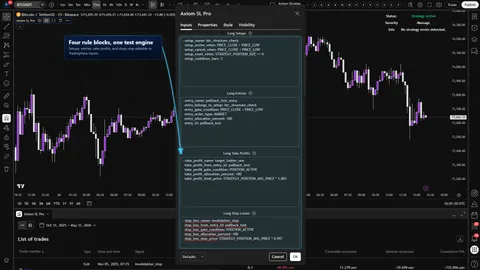
Axiom Strategy Lab Pro
Low-code strategy builder for traders who have rules worth testing and do not want to become Pine developers to do it.
1m5m15m1H4H1D
Crypto / Forex +4 / 1m / 5m +5
View productAxiom Charts builds indicators, strategy tools, and workflow helpers for traders who are tired of rebuilding context, retesting ideas from scratch, and wondering whether the tool is doing what it says.
Start with the part of the workflow that keeps dragging: reading structure, testing logic, managing volatility, reviewing risk, or keeping the process from falling apart mid-session.
Built for TradingView. Educational tools only. Nothing here is financial advice or a trade signal service.
strategy / Strategies / Strategy Builder +1
Low-code strategy builder for traders who have rules worth testing and do not want to become Pine developers to do it.
You do not need to know our product names yet. Pick the recurring friction point and use that as the way into the catalog.
Strategy / Backtesting
Challenge trading rules in a repeatable test environment before trusting them with real capital.
Risk / Trade Management
Define position behavior, exit ladders, stops, and circuit breakers before the test or trade is already in motion.
Context / Confluence
Keep higher-timeframe context and lower-timeframe execution from telling two different stories.
Volatility / Breakouts
Read compression, expansion, and band behavior before treating a move as tradable.
Rules / Workflow
Turn structured trading logic into reusable configuration instead of rewriting or regenerating strategy code for every idea.
Ranges / Structure
Frame highs, lows, channels, and breakout attempts so structure does not have to be rebuilt by eye every time.
Momentum / Oscillators
Compare momentum state, signal-line behavior, divergence, and stretched conditions without treating one oscillator read as a full trade plan.
Volume / Participation
Use volume-derived pressure as context for participation, imbalance, and follow-through instead of reading candles alone.
Trend / Bias
Separate directional bias, pullback state, and trend agreement before acting on price movement.
Featured products from the catalog, each built around a real chunk of chart work: clearer reads, cleaner tests, and less rework between sessions.
Low-code strategy builder for traders who have rules worth testing and do not want to become Pine developers to do it.
Crypto / Forex +4 / 1m / 5m +5
View product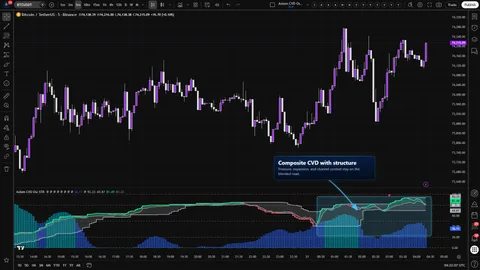
A five-slot multi-timeframe CVD oscillator with a weighted composite and optional structure context — divergence, Keltner, BBWP, and Donchian — all built on the composite itself. STR trades CTX's ten-slot breadth for blended-line structure.
Crypto / Stocks +3 / 1m / 5m +5
View product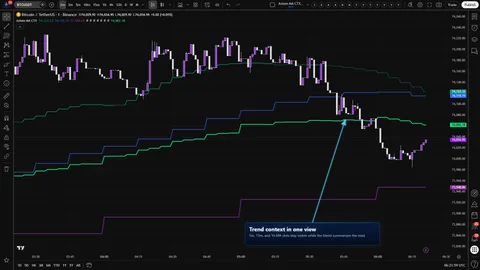
A ten-slot moving-average workbench with a weighted blended line, safe multi-timeframe reads, and optional cross-symbol studies. Built for operators who want to stack MA context without losing the ability to inspect each slot.
Crypto / Forex +4 / 1m / 5m +5
View productThe checkout flow stays simple, but the better question is whether this tool fits a problem you actually have.
01
Start from the product page and make sure the workflow fits the friction you are trying to remove.
02
Use the access choices shown on the product. Free tools open directly when available, and paid tools show their terms before checkout.
03
Paid tools use the existing cart and checkout flow. Free tools make the TradingView path visible without sending you through extra ceremony.
04
TradingView access and account steps are handled after purchase or from the product instructions so setup does not become its own project.
Did the chart make more sense? Did the test reveal something useful? Did the trader get through the work with less rework? Those are the outcomes we are chasing.
Every serious tool needs enough explanation for a trader to understand what it is doing, where it stops helping, and whether it belongs in the workflow.
The tool should make the workflow faster and clearer, not pretend it can remove uncertainty from the market.
If something feels off, we ask for the chart, settings, and what you expected to happen so we can get to the real issue quickly.
Axiom started as our own attempt to stop guessing with extra steps. The company came later. The first job was making tools we could inspect, question, and keep using when the chart got uncomfortable.
Yes. These tools are built for TradingView charts and workflows.
No. They are tools for context, testing, planning, and review. The decision still belongs to the trader.
Follow the product and account instructions after checkout. We are not promising instant access unless a product page says so clearly.
Use the footer legal links before checkout if those terms matter to your decision.
Only if you already understand why the pieces belong together. Otherwise start with the single tool that fits the recurring problem.
Product pages and docs should give enough context to decide whether the workflow fits before you commit. Free tools can be opened directly where available.
Use the problem picker, then reach out with the market, timeframe, and issue you are actually dealing with.
One tool, one real bottleneck, one honest attempt to make the work faster without hiding what is happening. Everything else can wait until that first step proves itself.